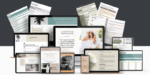
Visuals Mastery: Learn How To Create Visual Posts
$49.00 Original price was: $49.00.$19.00Current price is: $19.00.

Visuals Mastery: Learn How To Create Visual Posts
In the modern digital era, visual content is king. Social media platforms, blogs, and websites thrive on visually appealing posts that engage audiences. If you want to boost your online presence, mastering the art of creating captivating visuals is essential. This guide, Visuals Mastery: Learn How To Create Visual Posts, will provide everything you need—from design tips to advanced tools—to make your content stand out.
Why Visual Content Matters
The human brain processes images 60,000 times faster than text, making visuals a powerful tool for communication. Studies show posts with images receive significantly more engagement on social media compared to text-only content. Whether it’s Instagram, Facebook, Pinterest, or your blog, creating visual posts can increase click-through rates, shares, and overall engagement.
Moreover, visual storytelling helps your audience retain information better. When you pair a clear message with an appealing visual, your content becomes memorable. This is why brands invest heavily in graphic design and visual content strategies.
Key Principles of Visuals Mastery
To achieve true Visuals Mastery: Learn How To Create Visual Posts, understanding the fundamentals of design is crucial. Here are the key principles:
1. Simplicity
Cluttered designs confuse viewers. Use minimal text, clean layouts, and bold visuals to communicate your message effectively.
2. Consistency
Maintain a consistent color palette, font style, and imagery across all posts. This strengthens your brand identity and makes your content recognizable.
3. Balance
Balance visual elements, such as text, images, and icons, to avoid overwhelming the audience. Use white space effectively to give content room to breathe.
4. Contrast
High contrast between background and foreground elements improves readability and visual impact. Make your text pop by choosing complementary colors.
5. Alignment
Proper alignment of text and graphics ensures a polished, professional look. Misaligned elements can make even good content appear amateurish.
Tools to Create Stunning Visual Posts
To achieve Visuals Mastery, using the right tools is essential. Here are some highly recommended platforms:
Canva: Ideal for beginners, Canva provides pre-designed templates, graphics, and fonts for easy creation.
Adobe Photoshop: Perfect for advanced users seeking full control over design.
Figma: Great for collaborative visual content design.
Crello / VistaCreate: Similar to Canva, with additional animation features for dynamic posts.
Piktochart: Excellent for creating infographics and visual reports.
Using these tools effectively allows you to transform ideas into eye-catching visuals quickly.
Step-by-Step Guide to Creating Visual Posts
Here’s a detailed process for mastering visual content:
Step 1: Define Your Goal
Before designing, know the purpose of your post. Are you promoting a product, sharing information, or building brand awareness? Clarity in goal ensures your visuals resonate with the audience.
Step 2: Know Your Audience
Tailor your visuals based on your target audience’s preferences. For instance, youthful audiences respond well to bright, playful colors, while corporate audiences prefer minimalist designs.
Step 3: Choose the Right Format
Different platforms require different formats:
Instagram: Square or vertical posts
Facebook: Horizontal images
Pinterest: Tall vertical pins
Blogs: Featured images, infographics
Choosing the correct format enhances engagement and visibility.
Step 4: Select Colors and Fonts
Colors evoke emotions, while fonts reflect brand personality. Stick to 2–3 primary colors and choose readable fonts to maintain clarity.
Step 5: Use High-Quality Images
Blurry or pixelated images reduce credibility. Use high-resolution photos, icons, and graphics. Stock photo platforms like Unsplash, Pexels, and Pixabay provide excellent free options.
Step 6: Add Text Strategically
Text should complement visuals, not overwhelm them. Use headings, subheadings, and bullet points to convey information concisely.
Step 7: Incorporate Branding
Include logos, brand colors, and watermarks to reinforce your brand identity. This ensures your content remains recognizable even when shared.
Step 8: Test and Optimize
Analyze engagement metrics such as likes, shares, and comments. Experiment with different styles and formats to see what resonates best.
Advanced Techniques for Visuals Mastery
Once you’ve mastered the basics, explore these advanced strategies:
1. Animation and Motion Graphics
Adding subtle motion can make your posts more engaging. Tools like Canva, Adobe After Effects, and Crello allow you to animate text, icons, and images.
2. Infographics
Infographics condense complex information into digestible visuals. They’re highly shareable and effective for increasing website traffic.
3. Interactive Visuals
Polls, quizzes, and interactive sliders enhance user engagement. Tools like Typeform and Canva’s interactive templates can help.
4. Visual Storytelling
Tell stories through a sequence of images or carousel posts. Storytelling connects emotionally with your audience, making your content memorable.
5. Incorporate Trends
Stay updated with design trends like bold typography, minimalism, 3D elements, and gradients. Trendy visuals often get more engagement and shares.
Common Mistakes to Avoid
Even with Visuals Mastery, beginners often make mistakes that reduce impact:
Overcrowding: Too many elements create confusion.
Ignoring brand consistency: Inconsistent visuals dilute your identity.
Using low-quality images: Poor visuals harm credibility.
Neglecting mobile optimization: Many users view content on mobile devices. Design with responsive dimensions.
Avoiding these pitfalls ensures your visual posts remain professional and engaging.
Real-Life Examples of Successful Visual Posts
Nike: Their social media visuals combine bold images, minimal text, and strong branding, demonstrating Visuals Mastery.
Canva Tutorials: They share easy-to-follow visual tips that inspire users to create their own posts.
National Geographic: Stunning photography paired with concise captions keeps their audience engaged worldwide.
Learning from these examples can help you implement similar strategies in your content creation.
Measuring the Success of Your Visuals
To ensure your Visuals Mastery translates into results:
Track engagement metrics: likes, comments, shares, and saves.
Use tools like Google Analytics and social media insights.
Perform A/B testing with different designs to determine what works best.
This data-driven approach allows continuous improvement and higher content performance.
Conclusion
Visuals Mastery: Learn How To Create Visual Posts is not just about aesthetics—it’s about communicating effectively, engaging your audience, and reinforcing your brand. By understanding design principles, using the right tools, and implementing advanced strategies, anyone can create visually stunning posts that stand out in the crowded digital landscape.
Start today, experiment with styles, and embrace creativity. Remember, in the world of digital content, a single compelling visual post can leave a lasting impression.