Avalon Design – Freelancer OS (all-in-one template)
$60.00 Original price was: $60.00.$24.00Current price is: $24.00.

Avalon Design – Freelancer OS (all-in-one template): A Complete In-Depth Guide for Modern Freelancers
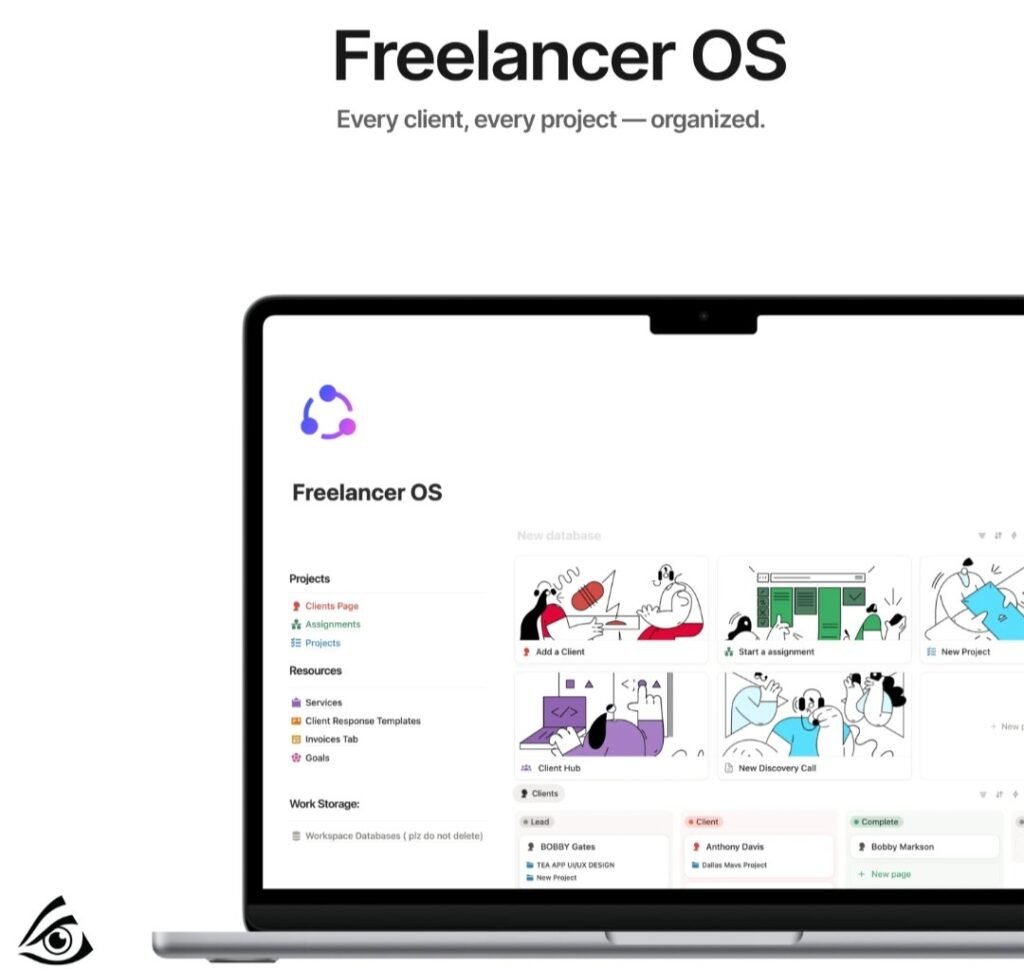
Freelancing has become one of the fastest-growing career paths in the digital world. Designers, developers, editors, marketers, consultants, and creators all rely on structured systems to stay productive. Managing clients, deadlines, invoices, deliverables, and finances can get overwhelming when everything is scattered. This is where a well-built digital workspace becomes a game-changer. One of the most advanced and polished systems created for freelancers today is Avalon Design – Freelancer OS (all-in-one template), a structured workspace designed to operate your entire business flow in one organized place.
This guide explains the structure, features, workflows, and advantages of using a comprehensive freelancer operating system. By the end, you’ll understand how such a system can transform your day-to-day work, increase your productivity, and make your business run smoother without the stress of juggling multiple tools.
1. Why Every Freelancer Needs a Complete Operating System
Freelancing looks simple from the outside: take projects, work on them, deliver, get paid. But anyone who has freelanced knows how chaotic it can get. A few of the main issues freelancers face include:
Forgetting client deadlines
Mismanaging project files
Losing track of invoices
Not knowing how much they earned this month
Overbooking tasks or double-booking meetings
Having no clear pipeline of leads
Difficulty setting priorities each day
Scattered communication across platforms
A Freelancer OS solves these issues by giving you a single dashboard to manage:
✔ Clients
✔ Projects
✔ Tasks
✔ Finances
✔ Content
✔ Personal productivity
✔ Asset library
✔ Meeting notes
✔ Schedules
✔ Templates & workflows
Instead of jumping between Google Sheets, Notion pages, invoices apps, note-taking tools, and random folders, you manage everything in one structured system. This boosts efficiency and clarity while reducing stress.
2. The Core Structure of a Freelancer OS
A strong operating system contains sections that handle every aspect of your workflow. Let’s break down the structure of a well-built OS and why each part matters.
3. Central Dashboard – Your Command Center
The main dashboard provides a complete bird’s-eye view of your entire business. A powerful OS features:
● Today’s Tasks
A real-time list of everything due today, color-coded by priority.
● Active Projects
At a glance, you can check progress, deadlines, and client details.
● Revenue Tracker
Shows your monthly income using calculated fields or charts.
● Lead Pipeline Summary
Helps you see new opportunities, proposals, follow-ups, and conversions.
● Quick Actions
Add a new task, client, or project with one click.
A central dashboard saves hours weekly by keeping everything in one place.
4. Client Relationship Management (CRM)
Freelancers often deal with multiple clients simultaneously. A CRM inside your OS helps you maintain strong communication and smooth project delivery.
Client Cards Include:
Client name + company
Contact details
Project history
Notes & preferences
Communication log
Important dates
Payment records
Attached files
This CRM ensures your client never needs to repeat information and you never lose context.
5. Project Management System
A robust OS includes a powerful project management segment. Each project contains:
● Scope & Description
Clear details about what needs to be done.
● Milestones
Break down big tasks into achievable phases.
● Subtasks
Keeps workflow clean and less overwhelming.
● Timeline View
A Gantt-style visualization to plan effectively.
● Deliverables Tracker
Ensures you submit everything professionally, on time.
● Feedback & Revision Log
Keeps track of changes requested by clients.
Your entire project cycle, from kickoff to delivery, stays documented and organized.
6. Task Management with Smart Filtering
A high-quality system lets you manage tasks using different views:
Daily task view
Weekly planning view
Priority sorting
Category sorting
Status sorting (To Do → Doing → Done)
Smart Features:
Deadline reminders
Automatic grouping
Recurring task setup
Linked tasks in projects
This lets you focus on meaningful work rather than wasting energy remembering what to do next.
7. Finance & Invoice Tracking
Most freelancers suffer because they don’t track their money properly. Your OS should include:
● Income Tracker
Records payments, dates, clients, and project associations.
● Expense Tracker
Helps you see where your money is going—tools, subscriptions, travel, etc.
● Profit Summary
Income minus expenses gives you accurate monthly profit.
● Invoice Manager
Stores invoice numbers, status, payment due dates, and client details.
● Automated Reminders
Know instantly which clients have pending payments.
Transparent finances mean better business decisions and stress-free accounting.
8. Content & Portfolio Management
Many freelancers depend heavily on content to grow their brand. The content hub helps manage:
Portfolio pieces
Case studies
Social media content
Blog posts
Client testimonials
Design files
Scripts or copy drafts
This section keeps your creative assets searchable and ready to use when needed.
9. Lead Pipeline & Sales Flow
A pipeline helps you move leads into paying clients. It usually includes:
Lead Stages:
New inquiry
Discovery call
Proposal sent
Negotiation
Closed—won
Closed—lost
Additional Tools:
Proposal templates
Follow-up reminders
Automated lead scoring
This ensures you never lose a lead due to forgetfulness and always maximize your chances of conversion.
10. Meeting Notes & Documentation
Freelancers often work with:
Client calls
Team meetings
Strategy sessions
Creative planning
A dedicated notes section lets you write meeting summaries, embed files, and connect notes directly to specific clients or projects. This avoids confusion and keeps communication records clean.
11. Template Library & Reusable Assets
A good operating system provides pre-built templates such as:
Onboarding checklist
Proposal format
Contract outline
Feedback request form
Handover checklist
Design brief template
Social media calendar
These templates save time and give your business a professional structure.
12. Personal Productivity & Life Organization
Many freelancers struggle with balancing work and personal life. A well-structured OS includes extra sections for:
Habit tracking
Goal setting
Journal or reflection space
Learning tracker
Book & course notes
Fitness tracking
Daily routine scheduler
When personal life is balanced, work productivity improves naturally.
13. How This System Improves Your Workflow
A freelancer operating system helps you:
✔ Work Faster
Everything is one click away—no wasting time searching.
✔ Reduce Stress
Clear visibility of deadlines and workload.
✔ Improve Client Satisfaction
More organized communication and timely delivery.
✔ Earn More
Better conversion rate + better time management = higher income.
✔ Maintain Professionalism
A structured backend makes you look polished and reliable.
✔ Scale Your Business
Easy to onboard new clients and handle more projects.
14. Who Benefits the Most from Such an OS
This type of system is perfect for:
Freelance designers
Writers & copywriters
Developers
Editors & filmmakers
Social media managers
Virtual assistants
Paid ads freelancers
Coaches & consultants
Photographers
Agency owners
Any solopreneur managing tasks, clients, and money
If your work requires coordination, tracking, communication, and project planning—this OS transforms everything.
15. Final Thoughts
A complete freelancer operating system is more than just a template—it’s a structured business backbone. It centralizes your communication, tasks, clients, money, and creative assets into one organized workflow. Whether you are just starting your freelance journey or already managing multiple clients, a system like this helps you operate like a professional, avoid mistakes, and grow confidently.
Such a well-designed OS gives you clarity, focus, and control—everything a freelancer needs to succeed in a competitive digital world.